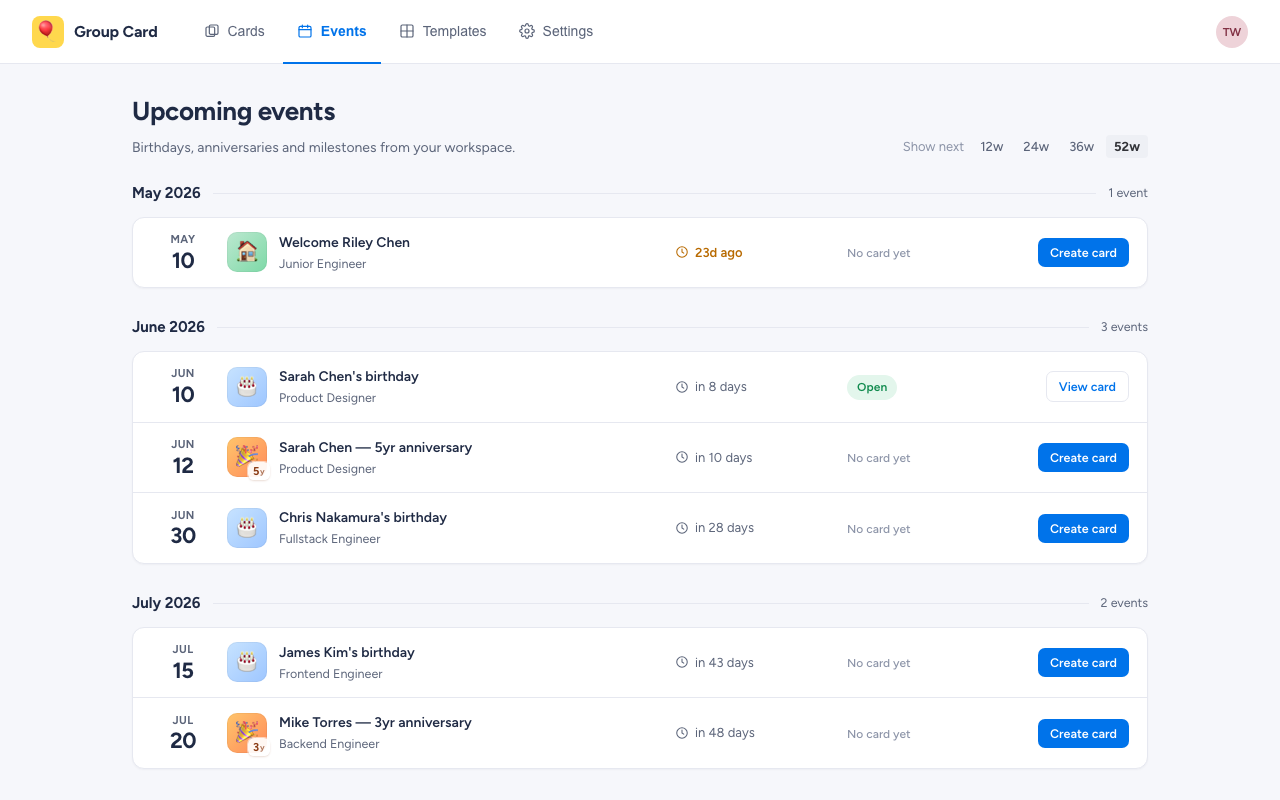
The Events tab turns Group Card into an early-warning system for the dates your team cares about. It reads birthdays and start dates from your monday workspace and lists everyone whose moment is coming up — so you can spin up a card before the day, not the morning of.
How to open it
Click the Events tab in the top nav, alongside Cards, Templates, and Settings. Every full member of the workspace can see Events.
What’s listed
Each row represents one upcoming moment:
- Birthdays — pulled from each user’s birthday field.
- Work anniversaries — derived from when the person became an active workspace member. The glyph shows the year count (1y, 5y, etc.).
- Welcomes — recent additions to the workspace, while their anniversary is still within the first year.
Events are grouped by month. Within a month, they sort by date. The countdown column highlights anything in the next seven days.
Adjusting the window
The “Show next” control on the top right toggles how far ahead Events looks: 12 / 24 / 36 / 52 weeks. Twelve weeks keeps the list tight; fifty-two surfaces everyone’s next birthday so you can plan a quarter ahead. The setting is workspace-wide — change it once and it sticks.
Creating a card from an event
Each row with no card yet has a Create card button. Click it and Group Card jumps you straight into the creation wizard with:
- The right occasion preselected (Birthday for a birthday, Anniversary for an anniversary).
- The recipient already filled in.
- The delivery date set to the event date.
You still pick the template and edit the cover message — but the boilerplate is done. See Creating a card for the rest of the wizard.
If a card already exists for an event, the row instead shows the card’s status (Draft, Collecting, Scheduled, Delivered) and a button that opens the card in place.
Why it might be empty
If you’ve widened the window to 52 weeks and Events is still empty, one of two things is happening:
- Nobody’s birthday or start date is set. Birthdays and start dates are stored on monday users, not in Group Card. Workspace admins can add them in monday’s user settings.
- You’re a guest or viewer. Guest accounts can’t see workspace member data, so they can’t see Events either.